WhatsApp Business for Restaurants: Bookings, Guest Questions and Privacy
How restaurants, cafés and hotels use WhatsApp Business for bookings and guest questions: app vs. platform, setup, templates, the 24-hour window and data protection.
By Viktor HolterUpdated: 6 min read
Key points
- The app is enough for one person; the Business Platform suits teams and several channels.
- On the platform you can reply freely for 24 hours, after that only with templates.
- Ask for date, time, party size and name in the greeting message.
- A dedicated work device, a note in your privacy policy, no marketing without consent.
Many guests would rather text than call. A WhatsApp message is quick to send, even at 11 pm when the restaurant is long closed. That’s why WhatsApp has become one of the most important channels for bookings, allergy questions and party enquiries in hospitality.
To stop WhatsApp turning into chaos on the owner’s personal phone, you need the right setup and a few clear rules. This guide covers both.
WhatsApp Business App or Business Platform?
Meta offers two options for businesses, and the differences matter for venues:
WhatsApp Business App
- Free app for phone and desktop, ideal for getting started.
- Business profile with address, opening hours and website.
- Quick replies, greeting and away messages, and labels for sorting.
- Limits: the account is tied to one phone, several staff can only work in parallel to a limited extent, and there’s no connection to other systems.
WhatsApp Business Platform (API)
- Connected through a provider or software such as a shared inbox.
- Several staff can reply at the same time, messages can be assigned and combined with other channels.
- Automated messages such as booking confirmations and reminders via Meta-approved templates.
- The number is registered for the platform, so plan the switch carefully.
Understanding the 24-hour window
On the Business Platform, one rule matters most: when a guest messages you, you can reply freely for 24 hours. After that, you can only send pre-approved templates, such as a booking reminder. Every new message from the guest reopens the window.
For restaurants this means: answer requests the same day if you can. A booking request from Friday night that isn’t answered until Monday can only get a template reply. Template messages are charged by Meta depending on their category, while replies within the window are currently free in most cases. Check Meta’s WhatsApp Business Platform pricing page for current rates.
Setup in six steps
- Use a dedicated number: a business number, not a personal phone. A landline works too; verification then happens by voice call.
- Complete your profile: venue name, category “Restaurant”, address, opening hours, website and a link to your menu.
- Set up a greeting message: briefly explain what details you need for a booking.
- Away message outside opening hours: say when you’ll reply. It prevents duplicate messages and calls.
- Create quick replies: for opening hours, directions, parking, allergens, group menus and cancellation policy.
- Link it everywhere: WhatsApp link (wa.me/yournumber) on your website, Google Business Profile, Instagram bio and as a QR code on the door.
Taking bookings over WhatsApp
The most common problem with WhatsApp bookings: details are missing and a long back-and-forth follows. Ask for everything up front in your greeting:
Hi and welcome to [Restaurant]! 👋 To book a table, please send us: • Date and time • Number of guests • Your name • Any special requests (allergies, high chair, occasion) We’ll confirm your booking as soon as possible.
Thanks, [Name]! Your table for [number] on [date] at [time] is booked. If you can’t make it, just let us know here so we can give the table to someone else. See you soon!
Important: enter every booking in your reservation book or system right away. WhatsApp is a communication channel, not a booking system. A reminder the day before also helps prevent no-shows. Read more in our guide to reducing restaurant no-shows.
Data protection: what to watch out for
Using WhatsApp in a business is possible under GDPR, but it takes care. The key points:
- Address book: the WhatsApp Business App can access the phone’s contacts. Use a dedicated business device that only stores business contacts. The Business Platform doesn’t access an address book.
- Privacy policy: mention WhatsApp communication in your privacy policy, including the transfer of data to Meta.
- Health data: allergy and intolerance details are sensitive. Keep them only as long as you need them for the booking.
- No marketing without consent: send newsletters or offers via WhatsApp only to guests who have explicitly opted in.
- Offer an alternative: guests should also be able to book by phone or email.
Quick replies for the most common requests
Most WhatsApp messages to a restaurant are one of a handful of questions. Prepared replies save time and still sound personal once you add names and details:
Hi [Name], thanks for your message! We’re fully booked on [date] at [time], I’m afraid. We still have a table at [alternative 1] or at [alternative 2]. Would either work for you?
Hi [Name], good question! [Dish] contains [allergens]. Without [allergen] we can offer you [alternative]. Please mention it again when you order so the kitchen takes extra care.
Hi [Name], thanks for your enquiry! To put together a quote we need: date and time, number of guests, the occasion, and whether you’d like a set menu or à la carte. We’ll get back to you by [time].
Hi! We’re open [days] from [time] to [time], and the kitchen closes at [time]. You’ll find us at [address]; parking is [note]. Shall we book you a table?
For allergy questions see our guide to allergen labelling on menus, and for groups our guide to Christmas party bookings.
Rules for the team
We know this from our own venues, two cafés and a restaurant: when WhatsApp lives on one phone, the message sits there as soon as that person is away. These rules prevent that:
- An owner per shift: who answers messages before service, and who afterwards?
- A target reply time: for example within two hours during opening hours, and the next morning for messages that arrive overnight.
- No personal phones: the work device stays at the venue, so chats don’t go on holiday.
- Handover with labels: mark chats as “open”, “waiting for guest” or “done” so the next shift knows where to pick up.
- Enter bookings straight away: what only exists in the chat is not in the reservation book that evening.
Frequently asked questions
What does WhatsApp Business cost?
The WhatsApp Business app is free. On the Business Platform, Meta charges for template messages depending on category and country, plus whatever your software provider charges.
Can several team members use the same number?
In the app through linked devices, which are limited in number. On the Business Platform any number of people can work with the same number through shared software.
Can I move from the app to the Business Platform later?
Yes, the number can be migrated. Check with your provider beforehand whether chat history is carried over and whether you can keep using the app alongside.
Can I send guests offers over WhatsApp?
Only if they have explicitly agreed. A booking request is not consent to marketing.
Bringing WhatsApp together with your other channels
For most venues, WhatsApp isn’t the only channel: requests also arrive via Instagram, Facebook, email and Google. Checking each channel in its own app quickly becomes overwhelming, especially mid-service.
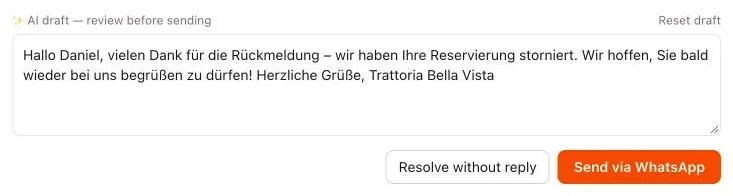
Hospello connects WhatsApp through the official Business Platform and shows every message in one inbox. The AI recognizes booking requests, highlights date, time and party size, and suggests a reply based on your knowledge base, with the right opening hours and allergen information. Your team reviews and sends it, ideally within the 24-hour window.