Answer Guest Messages Faster: How Restaurants Bring WhatsApp, Instagram, Email and Reviews Together
Requests via WhatsApp, Instagram, Facebook, email and Google: how restaurants and hotels organize guest communication, set priorities and reply faster without anything slipping through.
By Viktor HolterUpdated: 5 min read
Key points
- All channels in one place: if your team checks six apps, one always gets missed.
- Sort by urgency: same-day cancellations and allergy questions first.
- Fixed responsibilities and reply times, weekends included.
- A shared knowledge base keeps answers consistent across the team.
Restaurants answer guest messages faster when they bring every channel into one place, sort messages by urgency, assign clear responsibilities and keep common answers in a shared knowledge base. It’s necessary because guests now message you on WhatsApp, Instagram, Facebook, email and your Google Business Profile, and reviews expect a reply too. Every channel has its own app, and in many venues all communication runs through one person’s phone.
Almost every operator knows what happens next: a booking request gets lost, an allergy question waits until after service, an enquiry for a 40-person Christmas party is only spotted three days later. This guide shows how to bring order to guest communication.
Why fast replies drive revenue
Guests would rather write than call: in a 2024 Bitkom survey in Germany, 47 percent prefer to book a table directly online. People who write expect the answer the same way, and soon.
- Bookings: guests looking for a table at short notice often ask several restaurants at once and go with whoever answers first.
- Events: enquiries for parties, company dinners or catering are often the highest-value messages of the week. They deserve a same-day reply.
- Reviews: an unanswered complaint quickly turns into a public one-star review.
- No-shows: guests who wait too long for a confirmation book elsewhere and forget to cancel. More in our guide to reducing no-shows.
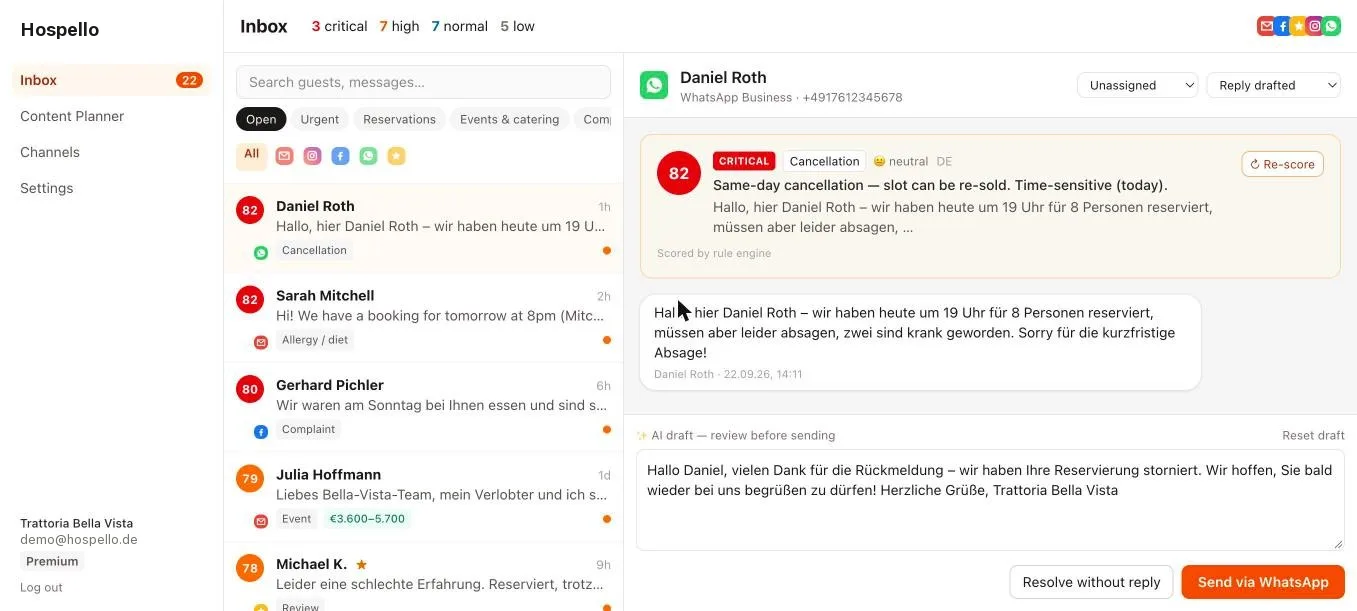
Step 1: All channels in one place
The most important step is bringing every channel into a single view. As long as your team has to check six apps, one will always be forgotten. There are two ways:
- Manually: set times when one designated person works through every channel in turn, with a checklist. It’s free but fragile once things get busy.
- A shared inbox: software that shows WhatsApp, Instagram, Facebook Messenger, email and Google reviews in one list. The whole team sees the same messages, and nobody has to hand over their personal phone.
Step 2: Set priorities
Not every message is equally important. A simple scheme helps you do the right thing first during a busy service:
- Right now: cancellations and changes for today, allergy and intolerance questions about upcoming visits, complaints after a visit.
- Today: booking requests, group and event enquiries, negative reviews.
- This week: general questions, positive reviews, partnership requests.
- When there’s time: advertising, spam, requests unrelated to your venue.
Step 3: Clarify who owns what
“Whoever has time” rarely works. Decide:
- Who answers messages on which shift, including weekends and closing days.
- When messages are handled, e.g. before lunch service, in the afternoon and after dinner service.
- Who takes event enquiries and complaints. Often that’s the owner or general manager.
- How messages are handed over when someone can’t answer a question.
Step 4: One knowledge base for everyone
Many questions repeat themselves: opening hours, parking, dogs, vegan dishes, gluten-free pasta, high chairs, group menus, cancellation policy. Write the answers down once, in one place the whole team can access. That way temporary staff answer as accurately as the owner, and you avoid contradictory information.
Keep the knowledge base current: summer opening hours, holiday closures or a new menu should go in immediately.
Step 5: Templates and tone of voice
Templates save time but shouldn’t sound like a call center. Decide how formal you are, how you greet guests and how you sign off. Adapt every template to the actual message: one sentence that addresses the guest’s question makes all the difference. You’ll find review templates in our guide on responding to Google reviews and booking templates in WhatsApp Business for restaurants.
Step 6: Measure what happens
Two simple metrics are enough to start:
- Response time: on average, how long from message to reply, per channel?
- Open messages at night: how many messages are still unanswered at the end of the day?
If response times spike on certain days, you know where to adjust staffing or processes.
Frequently asked questions
How quickly should a restaurant reply to messages?
A realistic target is two hours during opening times, otherwise the next morning. Event enquiries deserve a reply the same day. Read more in our guide on guest message response time.
Which messages are most urgent?
Cancellations and changes for today, allergy questions about upcoming visits and complaints after a visit. A cancellation for tonight is the only chance to re-sell that table.
Do I need software for this?
Not necessarily. With fixed times and a checklist you can check every channel by hand. Once you have several channels and changing shifts, a shared inbox helps because the whole team sees the same messages.
Which numbers should I track?
Two are enough to start: the average reply time per channel and the number of messages still open at the end of service.
How AI can help
AI doesn’t replace your team, but it can take a lot of routine work off its hands:
- Sorting: the AI recognizes whether a message is a booking, a cancellation, an allergy question, a complaint or an event enquiry, and ranks it by urgency.
- Summarizing: long emails are reduced to what matters.
- Drafting: based on your knowledge base, the AI suggests a reply in the guest’s language.
- A person decides: your team reviews, edits and sends. Nothing goes out without approval.
That’s exactly what Hospello does: WhatsApp, Instagram, Facebook Messenger, Gmail and Google reviews land in one inbox. Every message gets an urgency score from 0 to 100 with a reason, a summary and a draft reply. Hospello builds your knowledge base during setup from your website and Google listing, and you review it before it’s used.