Why fast replies on Instagram and WhatsApp matter
More and more guests no longer write an email, they send a direct message: is there still a table free, are there vegan dishes, can they bring the dog. Anyone asking on Instagram or WhatsApp expects an answer within minutes or hours – not days. If none comes, the guest often simply books somewhere else.
- Revenue: Many messages are bookings in disguise – table requests, birthdays, company parties.
- First impression: The reply to a DM is often the first personal contact with your business.
- Less effort: Most questions repeat. With good quick replies you answer them in seconds.
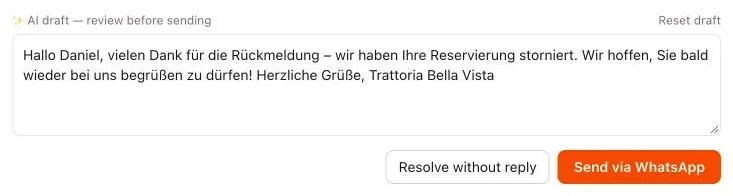
How the reply templates work
- Copy the guest's message from Instagram, WhatsApp, Facebook or your email inbox.
- Choose the channel – the reply is written in the matching style: short for social media, with a greeting for email.
- Optional: add facts that should go into the reply, such as opening hours or “there is still room on Saturday from 8 pm”.
- You get the message type, the urgency, two reply versions and a general quick reply.
- Save the quick reply in Instagram or WhatsApp Business – and have it ready next time.
The most common guest messages – and how to reply
Table request
Say thanks, ask for what is missing (date, time, number of people) and only confirm what you really know. If you have a booking system, link to it directly.
Hi Lisa, thanks for your message! How many of you will there be on Saturday, and what time would you like to come? Then we'll check for a table right away.
Allergies and intolerances
Take them seriously and don't promise anything the kitchen cannot guarantee. Offer to clarify the question directly with the kitchen. More in our guide to allergen labelling on the menu.
Opening hours, menu, directions
Answer briefly and specifically – and ideally point to your Google profile or website. These are exactly the questions that suit saved quick replies.
Groups, celebrations and events
These messages are often the most valuable. Reply quickly, ask about the occasion, budget and number of people, and offer a short phone call.
Complaints by direct message
As with negative reviews: say thanks, show understanding, offer a solution, don't justify yourself. The advantage of a DM: you can sort out the problem before it becomes a public review.
Saving quick replies in Instagram and WhatsApp Business
Both Instagram (“Saved replies” in the settings for business accounts) and WhatsApp Business (“Quick replies”) can store recurring answers that you call up with a shortcut. Set up five to ten templates for the most common questions – the quick reply from this tool is a good start. You will find more tips in our guides to Instagram marketing for restaurants and WhatsApp Business for restaurants.
When the messages become too many
Beyond a certain volume no template helps any more: messages get lost between four apps and nobody knows who has already replied. How to organise that is covered in our guide on how to answer guest messages faster.
Frequently asked questions
Which channels do the templates work for?
Instagram direct messages, WhatsApp, Facebook Messenger and email. The reply adapts to the channel: short and casual for social media, with a greeting and sign-off for emails.
Does the tool confirm bookings?
No. The tool does not know your availability, so it does not promise anything it does not know. Add free times in the “Facts for the reply” field and they will be used – otherwise the reply contains placeholders.
Does it work with messages in other languages?
Yes. The reply is written in the language of the message automatically.
What is the quick reply?
A general version of the reply with placeholders that you can reuse for similar messages – for example as a saved reply in Instagram or a quick reply in WhatsApp Business.
Is the tool free?
Yes, without signing up and without an email address. We only ask for your email address if you want to download the result as a PDF.
How do I answer all messages in one place?
With Hospello. Instagram, Facebook, WhatsApp, email and Google reviews land in one shared inbox – sorted by urgency and with a reply draft for every message.